AI Everywhere – But Not Everywhere Useful: Where I Use AI in 2026 (and Where I Don’t)
2026 is the year where you can’t really ignore AI anymore. It writes your emails, drafts your contracts, comments your code and happily plans your next weekend trip – at least according to the marketing pages.
At the same time, a lot of people are quietly asking themselves a different question: How much AI is actually healthy? Where does it really take work off your plate, and where are you just outsourcing your own thinking and responsibility?
In this article I want to share my personal rulebook. Not as an AI researcher or a hype marketer, but as someone who actually uses this stuff every day – at work, in side projects and in my private life. I’ll walk you through the areas where AI genuinely shines in my daily routine, the grey zones where I stay cautious, and the parts of my life where I deliberately say “no”, even though I technically could automate it.
Quick note before we start: some links in this article are affiliate links, mostly to Amazon. If you buy through them, I earn a small commission at no extra cost to you. I only recommend things I either use myself or would genuinely recommend to a friend.
Healthy skepticism instead of all-or-nothing thinking
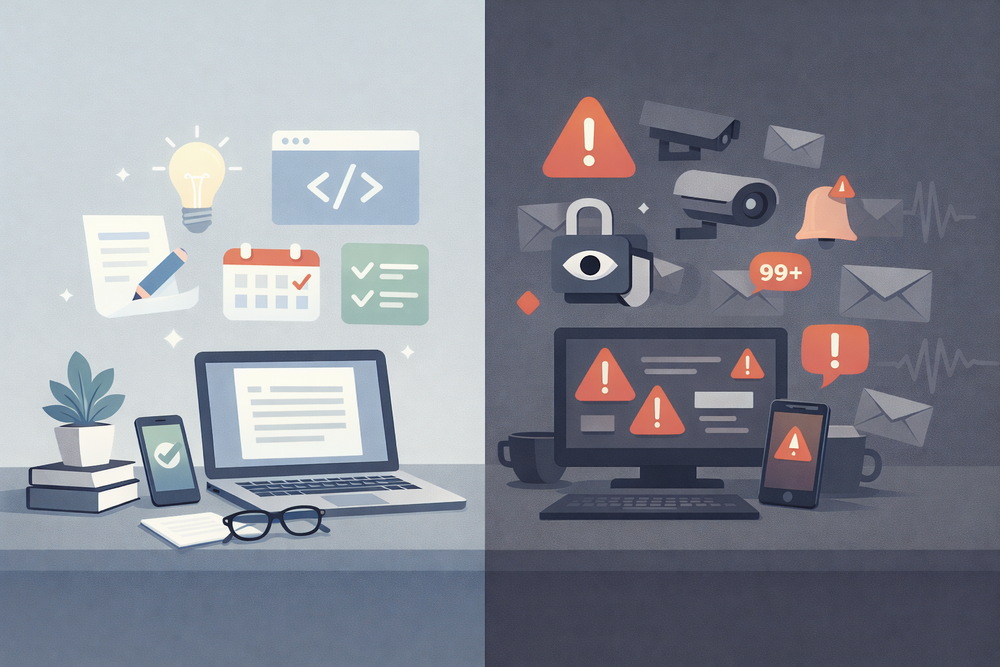
When people talk about AI, I mostly see two extremes. On one side, there are the “AI will do everything” folks. They want an agent that writes all their emails, does their job, picks their investments and somehow also cleans the kitchen. On the other side are the “AI is evil” people who block anything that looks remotely like automation, even if it would save them hours of boring work.
I don’t fully agree with either camp. For me, AI is a tool – a very powerful one – but still just a tool. The key is to be honest about what you’re delegating and what you’re not. I don’t want an AI to take over my judgment. I do want it to take over a lot of the boring glue work: drafting, summarising, restructuring, and sometimes even writing glue code for repetitive tasks.
So when I say “healthy skepticism”, I mean two things. First, I don’t assume AI is harmless or neutral. I’m careful with what data I feed it, especially when it lives in the cloud. Second, I don’t assume AI is magic. If something goes out with my name on it, I am responsible – not the model behind the screen.
Where AI really shines in my daily work
The area where AI brings me the most value is anything that starts with an empty page. Emails, blog posts, internal documentation, sometimes even tricky Slack replies – I rarely write those from scratch anymore. A very simple, practical example: I often start with a quick brain dump in plain text. It might look like this:
- tell customer that bugfix is done
- explain why it took longer (dependency upgrade)
- mention that we added a small bonus improvement
- ask them to confirm everything works on their side
- keep it friendly but not overly formal
I paste that into an AI assistant and ask for a first draft in my tone of voice. What comes back is usually 70–80% there. I then spend a couple of minutes editing phrases, adjusting details and making sure everything is actually correct.
The most important part for me: I never send AI-generated text “as is”. I always do a human pass. AI gives me speed and structure, but the responsibility and nuance stay with me.
The same is true for more public content like this blog. Sometimes I ask AI to suggest three different hooks or titles for a topic I already know I want to write about. I don’t let it decide whether I write the article – only how I might present it more clearly.
If you write a lot, the setup around AI matters more than yet another tool. A comfortable keyboard and a decent monitor often do more for your productivity than the tenth writing app. I’m currently using a mechanical keyboard that feels good for long sessions – nothing flashy, just reliable.
https://amzn.to/4tEGhYE
On the screen side, having enough space to see my editor, browser and AI assistant side by side makes a difference. A 27" monitor with at least 1440p resolution is a sweet spot for me.
https://amzn.to/4tTy0jU
The combination of a good physical setup and an AI assistant turns writing from “ugh, I have to start” into “okay, let’s rough it out and polish it”.
AI as an “exoskeleton” for coding and scripting
The second area where AI earns its place for me is in programming. I don’t want an AI to build entire systems unsupervised, but I absolutely want help with small scripts, boilerplate and debugging.
Take a simple automation example. Let’s say I receive structured emails every day and want to save a summary into a markdown file. I might start by telling an AI something like:
“Write a small Python script that reads all .eml files from a folder, extracts subject and date, and appends a one-line summary into a daily-notes.md file.”
The AI will give me a starting point that looks roughly like this:
import os
from email import policy
from email.parser import BytesParser
from datetime import datetime
import email.utils

INPUT_DIR = "emails"
OUTPUT_FILE = "daily-notes.md"

with open(OUTPUT_FILE, "a", encoding="utf-8") as out:
    for filename in os.listdir(INPUT_DIR):
        if not filename.endswith(".eml"):
            continue

        path = os.path.join(INPUT_DIR, filename)
                with open(path, "rb") as f:
            msg = BytesParser(policy=policy.default).parse(f)

        subject = msg["subject"]
        date = msg["date"]
        date_obj = email.utils.parsedate_to_datetime(date)

        line = f"- {date_obj.isoformat()} — {subject}\n"
        out.write(line)
Is this production-ready? No. But it gets me 80% of the way in seconds. From there I can tighten it up, add proper error handling, adapt it to my folder structure and drop it into a cronjob or an automation framework.
The same applies to refactoring. Sometimes I paste a noisy function into an AI and ask it to separate concerns or suggest more meaningful names. I don’t blindly accept the diff, but it often pushes me out of my own tunnel vision.
For code and scripts, AI is like an exoskeleton: it amplifies my abilities, but I still decide where to walk.
Grey zones: where I use AI carefully, not blindly
Then there are areas where I do use AI, but with extra guardrails.
Finances are a good example. I’m absolutely happy to let AI help me summarise PDFs from banks or insurers, explain weird fee structures or give me a plain-language summary of a contract. However, I don’t ask it “where should I invest?” and blindly follow the answer. Instead, I might ask it to explain how a specific ETF works, what the risks are or what certain terms mean. The decision of whether I actually put money into something stays with me.
Health is another grey zone. If I have a lab report or a medical article that’s full of jargon, I sometimes paste parts into an AI and ask: “Explain this to me like I’m not a doctor.” That can be incredibly helpful. But I try not to fall into the trap of using AI as a remote doctor. I might ask for questions I should bring to a real doctor, but not for a diagnosis or treatment plan.
Finally, there is family and kids. AI can be great for generating stories, explaining complex topics at different age levels or creating learning material. But I’m careful about letting an unsupervised AI chat directly with children, especially in a generic cloud app. If I do use AI in that context, I prefer setups where I sit in the middle, copy/paste the answers and filter them, or I use local models I control myself.
In all these grey zones, AI is allowed to inform me, structure things and translate jargon. It is not allowed to make decisions for me.
Where I deliberately don’t use AI
Now to the controversial part: the places where I consciously avoid AI, even if it would make things “easier”.
The first category is deeply personal decisions: relationships, family, big career moves. I might journal with an AI occasionally, treating it like a sounding board to get my thoughts out of my head. But when it comes to “Should I quit my job?” or “Should I move to another country?”, I don’t ask AI for a yes or no. It doesn’t know my full context, and even if it did, I don’t want to outsource my identity to a probability distribution.
The second category is security-critical actions. I’m fine with AI helping me write scripts or infrastructure definitions, but when it comes to actions like “transfer money if condition X is met” or “automatically click confirmation links in emails”, I always keep a human in the loop. AI is allowed to propose, never to silently execute. If I generate passwords or secrets, I store them in a proper password manager, not in some random chat window.
The third category is emotional support as a replacement for real people. AI can be surprisingly good at mirroring your feelings and offering kind words. Used carefully, that can help on a rough day. But I pay attention to whether it becomes a replacement for human contact. If I catch myself preferring a chat with an AI over talking to a friend because it’s “easier”, that’s a red flag for me.
In all these cases, the rule is simple: if a mistake or a drift would hurt deep parts of my life, I’d rather move slower without AI.
Local vs. cloud AI: why I care where it runs
Most mainstream AI tools are cloud-based. You open a website, type something, and your text goes to a server somewhere. For a lot of everyday tasks, I’m okay with that. If I’m drafting a generic email or brainstorming a conference talk, I don’t lose sleep over it.
However, there are categories of data where I don’t want to rely on “we care about your privacy” marketing lines. Private notes, family records,
anything related to health or finances – for that, I prefer to use local or self-hosted models whenever possible.
Running AI locally means you need a bit more hardware. In my experience, 32 GB of RAM and a fast NVMe SSD are where things start to feel usable for medium-sized models. You don’t need a monster GPU to experiment with smaller models, although it obviously helps for heavier workloads.
If you want to go this route, a compact mini PC can be a good starting point: small form factor, quiet, but powerful enough to run a few services and models.
https://amzn.to/4tEvKwG
Pair that with a decent 1–2 TB NVMe SSD, and you have enough room for multiple models and projects.
https://amzn.to/4rknAb5
For me, this isn’t about paranoia. It’s about having the option to keep some things entirely in my own infrastructure. Cloud AI is great for quick experiments and “low-risk” tasks. Local AI is where I put the parts of my digital life that I don’t want to spray across a dozen vendors.
The simple rules I try to live by
To make this less abstract, here are the simple rules I actually use day to day – not as theory, but as a quick gut check whenever I’m unsure.
If a mistake would be expensive or painful, I don’t rely on AI alone. I might let it draft or propose something, but I double-check and take responsibility for the final result.
If the topic is deeply personal or emotional, I see AI as a mirror, not as a compass. It can help me articulate my thoughts, but it doesn’t get to tell me who I am or what I should do.
If the work is repetitive, boring and low-risk, I happily throw AI at it. Summaries, first drafts, skeleton code, boilerplate – that’s exactly what machines are good at.
If the data is sensitive, I prefer local tools or self-hosted setups over cloud services whenever it’s realistic. If I have to use cloud AI, I strip the data down as much as possible.
And whenever I’m really not sure, I ask myself one more question:
“Would I be okay if this entire conversation – prompt and response – leaked publicly?”
If the answer is no, I either rethink what I’m about to paste, or I move it to local tools.
That’s how I try to navigate an “AI everywhere” world without giving up control over my own life.