Building an 'Ask the Company' Agent in Microsoft 365 Copilot
I’ve been playing more and more with Microsoft 365 Copilot lately, and one pattern keeps coming back:
The interesting part is not “answer my email”, it’s “answer questions about how our company works”.
Every organisation has the same type of question:
- “How do we do this here?”
- “Where is that documented?”
- “Have we done this before?”
The answers usually live somewhere in Confluence, SharePoint or Teams documents. But most of that knowledge is locked behind search, folder structures and tribal memory.
In this post I want to sketch how I’d build an “Ask the Company” agent in Microsoft 365 Copilot that:
- answers questions about a project,
- pulls information from Confluence,
- and notices when something is missing – so it can help you document it.
I’ll go through three pieces:
- the architecture idea,
- a simple backend with sample code (Node/TypeScript),
- and how Copilot can use it as an agent.
1. The idea: “Ask the Company” inside M365
The idea is simple:
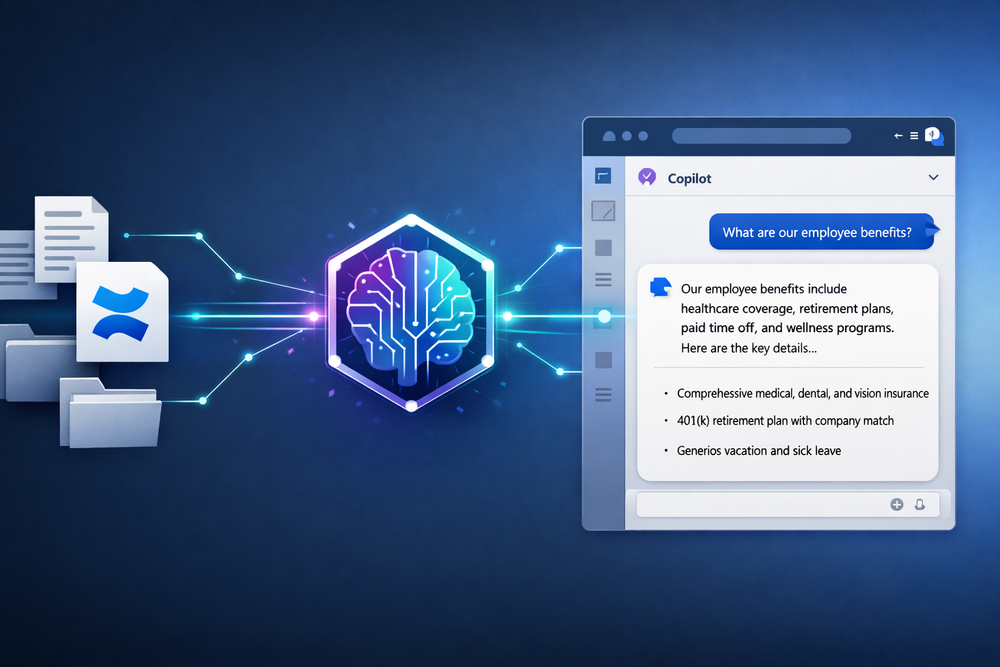
- In M365 Copilot you expose a new ability: Ask the Company.
- A user types: “How do we handle deployments for Project Phoenix?”
- Copilot calls your own backend (“CompanyAgent API”) with the question plus user/project context.
- The backend:
- searches Confluence for relevant pages,
- extracts the important passages,
- builds an answer,
- and flags when there is no or not enough documentation.
- If nothing is found, the agent suggests:
- creating a new Confluence page draft for this topic,
- based on what the user just asked.
The agent’s role is:
- Read: fetch knowledge from Confluence,
- Answer: compose a clear answer for Copilot,
- Learn: detect gaps and help to close them.
2. The backend: a simple Node/TypeScript example
Let’s build a minimal backend that:
- exposes a
/askendpoint, - searches Confluence via REST,
- and returns an answer plus a
missingInfoflag.
2.1 Basic Express setup
// src/server.ts
import express from 'express';
import bodyParser from 'body-parser';
import { searchConfluence, getConfluencePageExcerpt } from './confluence';
import { buildAnswerFromPages } from './rag';

const app = express();
app.use(bodyParser.json());

type AskRequest = {
  question: string;
  projectKey?: string;
  userEmail?: string;
};

type AskResponse = {
  answer: string;
  sources: { title: string; url: string }[];
  missingInfo: boolean;
};

app.post('/ask', async (req, res) => {
  const body = req.body as AskRequest;

  if (!body.question) {
    return res.status(400).json({ error: 'question is required' });
  }

  try {
    // 1) Search Confluence
    const pages = await searchConfluence(body.question, body.projectKey);

    if (pages.length === 0) {
      const answer = `I couldn’t find any documentation about "${body.question}" in Confluence. ` +
        `It might make sense to create a page for this topic.`;
      const response: AskResponse = {
        answer,
        sources: [],
        missingInfo: true
      };
      return res.json(response);
    }

    // 2) Fetch excerpts / content
    const excerpts = await Promise.all(
      pages.map(p => getConfluencePageExcerpt(p.id))
    );

    // 3) Build an answer
    const { answer, usedPages } = await buildAnswerFromPages(body.question, excerpts);

    const response: AskResponse = {
      answer,
      sources: usedPages.map(p => ({ title: p.title, url: p.url })),
      missingInfo: false
    };

    return res.json(response);
  } catch (err) {
    console.error('Error in /ask', err);
    return res.status(500).json({ error: 'internal_error' });
  }
});

const port = process.env.PORT || 3000;
app.listen(port, () => {
  console.log(`CompanyAgent API listening on port ${port}`);
});
2.2 Confluence search and excerpts
Confluence offers a REST API that you can call with CQL (Confluence Query Language). Here’s a simplified helper module:
// src/confluence.ts
import fetch from 'node-fetch';

const CONFLUENCE_BASE_URL = process.env.CONFLUENCE_BASE_URL!;
const CONFLUENCE_USER = process.env.CONFLUENCE_USER!;
const CONFLUENCE_TOKEN = process.env.CONFLUENCE_TOKEN!;

type ConfluencePage = {
  id: string;
  title: string;
  url: string;
};

export async function searchConfluence(query: string, projectKey?: string): Promise<ConfluencePage[]> {
  const cqlParts = [`text ~ "${query.replace(/"/g, '\\"')}"`];
  if (projectKey) {
    // Example: filter by space
    cqlParts.push(`space = "${projectKey}"`);
  }
  const cql = cqlParts.join(' AND ');

  const url = new URL('/rest/api/search', CONFLUENCE_BASE_URL);
  url.searchParams.set('cql', cql);
  url.searchParams.set('limit', '5');

  const res = await fetch(url.toString(), {
    headers: {
      'Authorization': 'Basic ' + Buffer.from(`${CONFLUENCE_USER}:${CONFLUENCE_TOKEN}`).toString('base64'),
      'Accept': 'application/json'
    }
  });

  if (!res.ok) {
    console.error('Confluence search error', await res.text());
    return [];
  }

  const data = await res.json() as any;
  const results = data.results ?? [];

  return results.map((r: any) => ({
    id: r.content.id,
    title: r.content.title,
    url: `${CONFLUENCE_BASE_URL}/pages/${r.content.id}`
  }));
}

export async function getConfluencePageExcerpt(pageId: string): Promise<{ id: string; title: string; url: string; text: string }> {
  const url = `${CONFLUENCE_BASE_URL}/rest/api/content/${pageId}?expand=body.storage`;

  const res = await fetch(url, {
    headers: {
      'Authorization': 'Basic ' + Buffer.from(`${CONFLUENCE_USER}:${CONFLUENCE_TOKEN}`).toString('base64'),
      'Accept': 'application/json'
    }
  });

  if (!res.ok) {
    console.error('Confluence get page error', await res.text());
    throw new Error('confluence_error');
  }

  const data = await res.json() as any;
  const html = data.body.storage.value as string;
  const text = stripHtml(html).slice(0, 5000);

  return {
    id: data.id,
    title: data.title,
    url: `${CONFLUENCE_BASE_URL}/pages/${data.id}`,
    text
  };
}

function stripHtml(html: string): string {
  return html.replace(/<[^>]+>/g, ' ').replace(/\s+/g, ' ').trim();
}
2.3 Building an answer with an LLM
Next we need something that takes the found texts and the user’s question and produces an answer. In a real system you’d likely use RAG with vector search and a local or cloud LLM.
Here’s a minimal example assuming you have a callLLM() function somewhere:
// src/rag.ts
import { callLLM } from './llmClient';

type PageExcerpt = {
  id: string;
  title: string;
  url: string;
  text: string;
};

export async function buildAnswerFromPages(question: string, pages: PageExcerpt[]): Promise<{ answer: string; usedPages: PageExcerpt[] }> {
  const prompt = `
You are an internal documentation assistant. Answer the question based ONLY on the information below.
If the docs don’t contain a clear answer, say so.

Question:
${question}

Docs:
${pages.map((p, i) => `[#${i + 1}] ${p.title}\n${p.text}`).join('\n\n')}
`;

  const answer = await callLLM(prompt);

  // Simple heuristic: assume all pages were used
  return { answer, usedPages: pages };
}
With just these three modules you have a very simple but end‑to‑end working “Ask the Company” backend:
POST /askreceives a question,- looks up relevant docs in Confluence,
- asks an LLM to summarise them,
- and tells you if nothing was found.
3. Letting Copilot talk to the agent
For Copilot to use this backend, you need to expose it as a function Copilot can call – for example via Copilot Studio, a Graph connector, or an HTTP plugin-style integration.
The conceptual model is always the same:
- you describe what your backend can do,
- Copilot decides when to call it, based on the user’s request.
A simplified JSON description for an HTTP-style tool could look like this:
{
  "name": "companyDocumentation",
  "description": "Answer questions about internal projects by searching Confluence",
  "functions": [
    {
      "name": "askCompany",
      "description": "Get an answer to a company/project-related question from Confluence",
      "parameters": {
        "type": "object",
        "properties": {
          "question": {
            "type": "string",
            "description": "The user's question in plain language"
          },
          "projectKey": {
            "type": "string",
            "description": "Optional project/space key used to narrow the Confluence search"
          }
        },
        "required": ["question"]
      }
    }
  ]
}
From Copilot’s perspective, a conversation might look like this:
- User: “How do we handle hotfix deployments for Project Phoenix?”
- Copilot:
- recognises that this is an internal process question,
- calls
askCompanywithquestion+projectKey = "PHOENIX", - receives
{ answer, sources, missingInfo }, - and builds a response such as:
- “According to our docs: …” plus links to the sources,
- or: “I couldn’t find any documentation; we should probably create some.”
If missingInfo is true, you can add a second function like:
createConfluencePageDraft(title, content)
Copilot could then propose a draft documentation page based on the question and what is known so far, so that someone can refine and publish it later.
4. What’s missing in a real implementation?
The prototype above deliberately skips a few hard but important topics:
- Authentication and permissions.
The agent should act on behalf of the signed‑in user, respect Confluence permissions, and make sure it doesn’t surface pages the user shouldn’t see. - Disambiguation.
If the search returns multiple topics (“deployments for App A vs App B”), the agent should ask follow‑up questions instead of guessing. - Feedback into documentation.
You could log which questions are asked most often and whether there’s good documentation for them – great input for documentation sprints.
But as a starting point, the pattern:
- Copilot → HTTP agent → Confluence + LLM → answer + missingInfo
is already surprisingly powerful.
5. Why this is where Copilot gets interesting
The part of Microsoft 365 Copilot that excites me is not that it can summarise emails or rephrase text – that’s useful, but generic.
It gets interesting when Copilot:
- has access to your systems (Confluence, Jira, SharePoint, line-of-business APIs),
- can talk to your agents,
- and can answer questions like “How do we do X?” instead of just “What does the internet say about X?”.
The “Ask the Company” agent here is a sketch, but it shows the basic idea:
- AI reads what you’ve already documented,
- answers questions from that,
- and highlights where your documentation has gaps.
That’s the kind of pattern I expect to become normal in M365 Copilot over the next years – and the kind of thing I’d rather experiment with now than wait until someone else ships it for me.