Claude Code Swarm Mode: When Your AI Stops Being a Helper and Starts Acting Like a Team
I’ll be honest: for a long time I treated “AI coding assistants” like a fancy autocomplete with attitude. Useful, sometimes brilliant, sometimes confidently wrong — and always a bit… linear. You ask. It answers. You paste. You fix. Repeat.
Then I stumbled into the idea behind Swarm Mode in Claude Code, and my brain did that little “wait… that actually makes sense” flip.
Because Swarm Mode isn’t about making one assistant smarter.
It’s about turning one assistant into a team.
And if you’ve ever tried to ship anything non-trivial — a new feature, a refactor, a migration, a messy integration with a legacy API — you already know why that matters: real work is rarely a single-threaded problem.
So let’s talk about what Swarm Mode is, how it feels in practice, what it’s good at, what it’s bad at, and how you can replicate the same pattern even without the “official” tooling.
And yes — there will be code. Not just bullet points.
The moment you realize: one AI is not enough
You know the situation.
You start with something innocent like:
“Add authentication to this API.”
And five minutes later you’re juggling:
- middleware decisions,
- token handling,
- refresh flows,
- tests,
- docs,
- edge cases,
- and suddenly your “quick change” has become a mini-project.
A single AI assistant can help — but it also becomes the bottleneck. It can’t really parallelize. It can’t “split itself” into roles. It tries to do everything in one stream, and you end up babysitting it like a junior dev on their first day with production access.
Swarm Mode basically says:
Stop forcing one model to be the architect, developer, QA, and documentation writer at the same time.
Instead: give those responsibilities to different agents — and coordinate them.
That’s the core shift.
What “Swarm Mode” actually means (without marketing fluff)
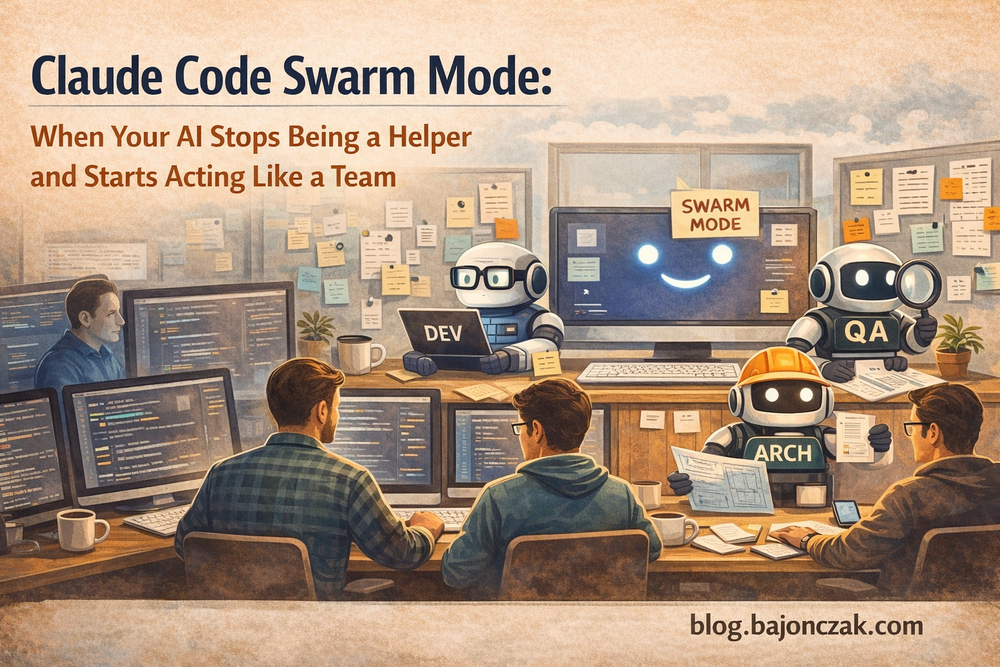
Swarm Mode is the multi-agent workflow idea applied to coding:
- A Manager agent breaks work into tasks and keeps the bigger picture.
- One or more Builder agents implement things.
- A QA agent tests, pokes holes, tries to break assumptions.
- A Docs agent writes the docs (so you don’t have to “later”, because later never happens).
The big win is not that the AI becomes magical. The win is that the workflow becomes structured:
- Plan
- Split
- Execute in parallel
- Validate
- Merge
- Document
That’s how teams ship software. Swarm Mode is basically trying to copy that pattern with AI actors.
And once you see it, you can’t unsee it.
Why the Git Worktree idea is actually genius
One of the clever parts in the Swarm approach is isolation: each agent works in its own sandbox so they don’t step on each other constantly.
If you’ve ever tried to have two humans work in the same file at the same time — you already know the pain. With multiple agents it’s even worse.
So the workflow leans on Git worktrees (or an equivalent isolation mechanism):
- Agent A gets a clean working directory
- Agent B gets another one
- They both modify code independently
- You only merge what passes tests and actually makes sense
In human terms: multiple branches with a strict merge gate.
This is the part where it stops being “toy AI demo” and starts feeling like an engineering workflow.
A practical starting point: define your swarm rules (CLAUDE.md style)
If you want multi-agent workflows to not degrade into chaos, you need rules.
Not “maybe do tests if you feel like it” rules. Real rules.
Here’s a practical example of what a swarm protocol file could look like (you can adapt the naming, but the structure is what matters):
# Swarm Protocol

## Triggers
- "Activate Swarm Mode"
- "Start swarm"

## Roles
- Manager: plans tasks, assigns work, merges results, does NOT write production code
- Builder: implements code changes
- QA: writes and runs tests, hunts for edge cases
- Docs: updates README / docs / changelog

## Rules
- Each agent works in an isolated worktree/branch
- No code is merged without passing tests
- Builder must add or update tests if behavior changes
- QA must provide at least 3 edge cases per task
- Docs must include a short "How to use" snippet for new features

## Output format
- Manager produces: task list, acceptance criteria, merge plan
- Builder produces: PR-ready code + notes
- QA produces: test results + failure reproduction steps
- Docs produces: markdown updates + examples
This looks boring. It’s not.
This is the difference between “AI that kinda helps” and “AI that behaves like a process”.
What it feels like when it works
When Swarm Mode works well, it’s almost unsettling.
You don’t ask:
“Write this module.”
You ask:
“Here’s the goal. Build it. Test it. Document it. Don’t break anything.”
And instead of one wall of output, you get:
- a plan,
- parallel progress,
- tests and edge cases,
- docs updates,
- and a merge summary.
That’s not a chatbot experience. That’s a mini delivery pipeline.
But… there’s a catch.
The hidden cost: coordination and “token burn”
Multi-agent workflows are not free.
Even if you run locally, you pay in:
- CPU/GPU time,
- context duplication,
- coordination overhead,
- and yes: more tokens if you use APIs.
This is why Swarm Mode is not something you use for everything.
If your task is:
“Rename a variable and update a comment.”
Do not spawn four agents. That’s like inviting a full Scrum team to change a button color.
Swarm Mode shines when the task is:
- broad,
- multi-step,
- easy to split,
- and expensive to debug later.
A real-world style example: shipping a feature without losing your weekend
Let’s imagine a feature request that sounds simple but is not:
Add JWT authentication to a REST API, include refresh tokens, add tests, and update docs.
A single assistant will often:
- implement a happy path,
- skip tests,
- forget docs,
- and leave you with security foot-guns.
A swarm workflow can split it like this:
Manager task breakdown
- Task 1: Add auth middleware + JWT validation
- Task 2: Add login endpoint + token issuing
- Task 3: Add refresh token flow + storage strategy
- Task 4: Add test suite + edge cases
- Task 5: Update docs + examples
And then the workers run in parallel.
That’s the point: you stop doing “one conversation marathon” and start doing “task execution”.
Example code: A lightweight swarm orchestrator (DIY, local-friendly)
Now to the fun part: you can build the same pattern yourself.
Below is a minimal swarm-style orchestrator in Python that works nicely with a local model endpoint (e.g., Ollama-like HTTP APIs). The goal is not to be perfect — it’s to show the architecture.
1) A basic Agent abstraction
import asyncio
import json
import aiohttp
from dataclasses import dataclass

@dataclass
class Agent:
    name: str
    role: str
    model: str
    endpoint: str = "http://localhost:11434/api/generate"

    async def run(self, task: str, context: str = "") -> str:
        prompt = f"""
You are {self.name}. Role: {self.role}.

Context:
{context}

Task:
{task}

Output:
Return ONLY your contribution. Be concrete. If code is needed, include it.
"""
        payload = {"model": self.model, "prompt": prompt, "stream": False}

        async with aiohttp.ClientSession() as session:
            async with session.post(self.endpoint, json=payload) as resp:
                data = await resp.json()
                return data.get("response", "").strip()
2) The orchestrator that coordinates the swarm
class Swarm:
    def __init__(self, manager: Agent, builders: list[Agent], qa: Agent, docs: Agent):
        self.manager = manager
        self.builders = builders
        self.qa = qa
        self.docs = docs

    async def execute(self, goal: str) -> str:
        # Step 1: Manager creates a plan + acceptance criteria
        plan = await self.manager.run(
            task=f"Break down this goal into tasks with acceptance criteria: {goal}",
            context=""
        )

        # Step 2: Builders implement in parallel (each gets the plan)
        builder_tasks = [
            b.run(task=f"Implement the solution for: {goal}", context=plan)
            for b in self.builders
        ]
        builder_results = await asyncio.gather(*builder_tasks)

        # Step 3: QA reviews + suggests tests and edge cases
        qa_result = await self.qa.run(
            task="Review the proposed implementation. Provide tests and edge cases. Point out risks.",
            context=plan + "\n\n" + "\n\n".join(builder_results)
        )

        # Step 4: Docs writes usage docs
        docs_result = await self.docs.run(
            task="Write documentation updates and a short usage example.",
            context=plan + "\n\n" + "\n\n".join(builder_results) + "\n\n" + qa_result
        )

        # Step 5: Manager produces a merge-ready summary
        final = await self.manager.run(
            task="Produce a final, merge-ready output: summary, code snippets, test plan, and doc changes.",
            context=plan + "\n\n" + "\n\n".join(builder_results) + "\n\n" + qa_result + "\n\n" + docs_result
        )

        return final
3) Running it
async def main():
    manager = Agent("ManagerAI", "Tech Lead / Planner", model="phi3")
    builders = [
        Agent("BuilderA", "Backend Developer", model="phi3"),
        Agent("BuilderB", "Implementation Assistant", model="phi3"),
    ]
    qa = Agent("QA-AI", "Test Engineer", model="phi3")
    docs = Agent("Docs-AI", "Technical Writer", model="phi3")

    swarm = Swarm(manager, builders, qa, docs)

    result = await swarm.execute("Add JWT auth + refresh tokens to a FastAPI app, with tests and docs.")
    print(result)

if __name__ == "__main__":
    asyncio.run(main())
This is the “poor man’s Swarm Mode”, but it already gives you:
- planning,
- parallel code proposals,
- testing mindset,
- documentation output,
- and a final consolidation.
Is it perfect? No.
Is it wildly better than a single long chat thread for complex tasks? Often, yes.
The part nobody tells you: swarms need guardrails or they become noise
If you just spawn agents and let them freestyle, you’ll get:
- conflicting implementations,
- duplicated effort,
- mismatched assumptions,
- and a lot of text that feels productive but isn’t.
Here are the guardrails that make swarms actually useful:
1) Acceptance criteria are non-negotiable
If the Manager doesn’t define “done”, you’re building vibes, not software.
2) Keep roles strict
If your QA agent starts coding and your Builder starts writing docs, you’ve lost the structure.
3) Force a merge gate
No tests = no merge. It sounds strict. It saves you later.
4) Start small
Don’t begin with “rewrite my entire backend”.
Start with one feature that’s easy to slice.
5) Don’t over-swarm
More agents ≠ more value.
Past a certain point you’re just generating extra coordination overhead.
So… should you use Swarm Mode?
If you mostly do:
- tiny edits,
- quick scripts,
- small refactors,
then Swarm Mode will feel like overkill.
But if you regularly touch:
- bigger codebases,
- multi-step integrations,
- features where tests and docs matter,
- complex bug hunts,
- migrations,
then Swarm Mode is the first AI workflow that actually feels like it respects how real engineering works.
It turns “AI helped me type faster” into:
“AI helped me ship.”
And that’s a different category.
Closing thoughts
I like tools that reduce chaos.
Swarm Mode — or the swarm pattern in general — is interesting because it doesn’t promise a smarter model. It promises a smarter process.
And process is what usually kills projects, not lack of intelligence.
If you try it, my honest recommendation:
- define roles,
- write your rules,
- enforce tests,
- and treat it like a team.
Because the moment you treat your AI like a team, you’ll start building like a lead — not like a prompt jockey.
If you want, paste me one real task you’re currently doing (something annoying but realistic), and I’ll rewrite it into a “swarm-ready” task breakdown + a CLAUDE.md protocol tailored to your setup.