Copilot Governance Playbook: Who Owns What in 2026?
Rolling out Microsoft 365 Copilot is not just “turning on a feature”.
Once the first excitement fades, you end up with a much more practical set of questions:
- Who decides which data Copilot can see?
- Who owns custom plugins and agents?
- Who cleans up the mess when something goes wrong?
If you don’t answer those questions upfront, you get what I keep seeing in the field: Copilot pilots that start strong, then slowly stall because nobody is really in charge of governance.
In this post I want to sketch a pragmatic Copilot governance playbook for 2026 – not a 50‑page policy, but a concrete set of roles, decisions and examples that you can actually work with.
Copilot governance is not a new silo
Good news first: you don’t have to invent a completely new governance world just for Copilot.
Most organisations already have pieces that matter here:
- Microsoft 365 / Entra ID admins,
- Security and compliance owners,
- data owners for key systems (HR, finance, sales, operations),
- a central architecture or IT strategy function.
Copilot governance is mostly about getting those people to agree on a few things:
- what problems Copilot is supposed to help with,
- which data sources are in and out of scope,
- how you handle extensions (Graph connectors, plugins, agents),
- how you react if something goes wrong.
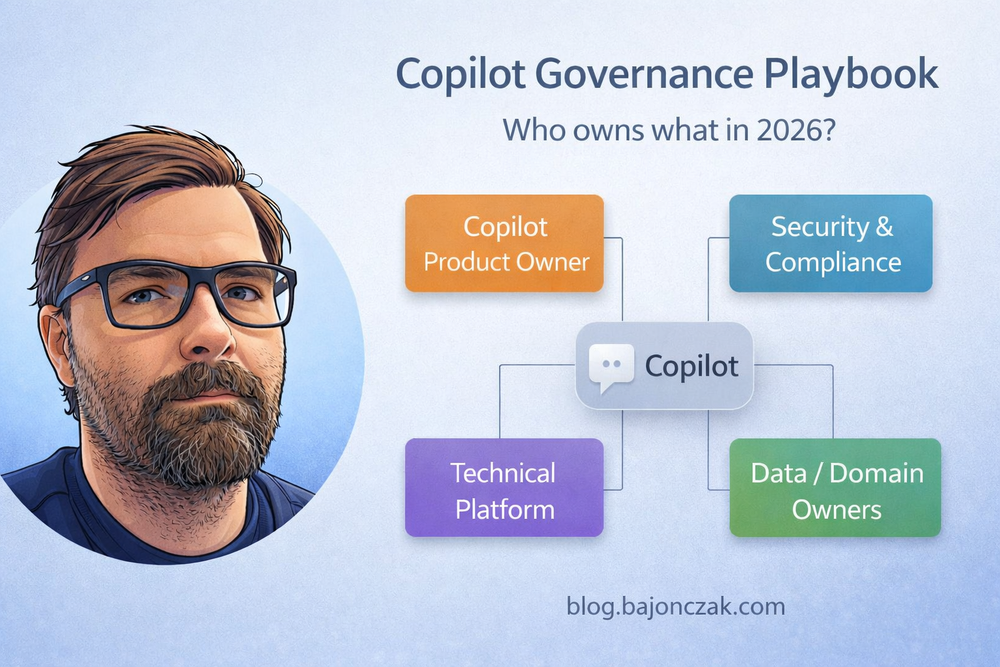
To make that concrete, I like to frame governance around four roles and a small set of recurring decisions.
Four roles you should make explicit
You can call them what you like, but these are the roles I’d define explicitly for Copilot in a mid‑sized or large organisation:
- Copilot Product Owner
- Security & Compliance Owner
- Data / Domain Owners
- Technical Platform Owner
1. Copilot Product Owner
This is the person (or small team) responsible for Copilot as a “product” inside your organisation:
- defines the vision and main use cases,
- prioritises which departments and scenarios to tackle,
- coordinates training, enablement and communication,
- is the first escalation point when people ask “can Copilot do X?” or “why can’t it do Y?”.
They don’t own all the technical details, but they keep the overall story coherent.
2. Security & Compliance Owner
This role cares about:
- data classification and protection,
- regulatory requirements (finance, public sector, healthcare, etc.),
- incident response if something leaks or goes wrong.
They don’t say “no” to everything. They help define:
- which data categories are in scope for a general Copilot,
- where you require special handling (e.g. separate HR or legal agents),
- what logging and auditing you need around Copilot extensions.
3. Data / Domain Owners
These are the people who know and own specific areas:
- HR / people data,
- finance and accounting,
- sales and customer data,
- operations, manufacturing, etc.
For Copilot, they answer questions like:
- “Which systems and sites actually hold our critical HR/legal/finance data?”
- “What are we comfortable exposing to a general Copilot vs. a specialised agent?”
- “Which questions should Copilot not be able to answer at all?”
4. Technical Platform Owner
This is usually a joint effort between:
- Microsoft 365 / Entra ID admins,
- infrastructure / platform teams,
- and sometimes an integration team (for Graph connectors, plugins, agents).
They take the decisions from the other roles and turn them into:
- tenant and service configuration,
- permission models and group design,
- technical standards for connectors and plugins,
- monitoring and troubleshooting practices.
The decisions you can’t dodge
Once you have those four roles, you can walk through a concrete decision set. For a Copilot rollout, I usually start with these:
- Scope: what is Copilot for in our organisation?
- Data sources: which systems and sites are in/out of scope?
- Extensions: which Graph connectors, plugins and agents are allowed?
- Guardrails: which topics and actions are off limits?
- Operations: how do we monitor, support and update Copilot?
1. Scope: what is Copilot for?
This sounds trivial, but writing it down avoids a lot of confusion.
Example scope statement:
“For 2026, our primary Copilot goal is to support knowledge work inside Microsoft 365: summarising documents, mails and chats, drafting content, and helping find existing information. We deliberately do not treat Copilot as a generic front‑end for all business systems.”
That one paragraph already narrows expectations and keeps you out of “can Copilot just read SAP/Salesforce/our mainframe?” debates for the first phase.
2. Data sources: what’s in and what’s out?
Here you combine the views of the Copilot product owner, security and data owners.
At minimum, I’d expect a table like this (kept somewhere people can actually find it):
- M365 content (SharePoint, OneDrive, Teams): in scope, but with permission cleanup required.
- HR systems: out of scope for general Copilot; only via specialised agents with HR approval.
- Finance / core ERP: out of scope for general Copilot; reporting via curated documents is fine.
- Ticketing / KB systems: in scope via Graph connectors, with proper ACL mapping.
- Public websites / internet: in scope only where explicitly configured (e.g. specific trusted sources).
This doesn’t need to be perfect on day one, but it needs to exist. Otherwise, every team will assume their favourite system is “obviously” in scope.
3. Extensions: connectors, plugins, agents
This is where things get interesting – and risky.
You should be explicit about:
- which built‑in Graph connectors you allow (e.g. file shares, websites, third‑party apps),
- who can propose and approve new connectors,
- how you handle custom plugins and MCP/Foundry‑style agents.
Example rules I’ve seen work well:
- Only the platform team can deploy new Graph connectors into production.
- Every connector needs a data owner sign‑off and a short ACL concept.
- Custom plugins/agents must:
- use user context (no anonymous god‑mode service accounts),
- log who did what,
- pass a basic security design review before going live.
If you use Foundry or a similar platform, this is also where you define which agents are “Copilot‑visible” tools and which are internal only.
4. Guardrails: what should Copilot not do?
Every organisation has topics where a generic Copilot should probably not help:
- sensitive HR topics (individual performance, compensation, layoffs),
- ongoing investigations or legal cases,
- very sensitive security content (incident response runbooks, red‑team material).
You can’t prevent people from asking those questions. But you can define how Copilot should behave when they do.
Example guardrail policy:
- General Copilot experiences should not answer questions about individual salaries, performance reviews or planned terminations.
- For such topics, the default answer should be a polite refusal and, where appropriate, a pointer to the correct HR or legal contact.
- If specialised HR/legal agents are built, they must be scoped to specific roles, with explicit topic whitelists, not just the absence of a deny list.
On the technical side, those guardrails live in:
- data scoping (don’t index everything),
- backend logic in agents,
- prompt instructions in plugins and extensions.
5. Operations: who watches Copilot in production?
Finally, someone has to treat Copilot as a living system, not a one‑off rollout.
Questions you should have answers for:
- Where do users go when Copilot behaves strangely or seems to leak something?
- Who looks at usage patterns and feedback to spot problems?
- How often do you review connectors, plugins and agents to see if they are still needed and safe?
In organisations that do this well, Copilot has a lightweight operational rhythm: monthly or quarterly reviews, a small backlog of improvements, a known channel for feedback.
Example: how this could look in a mid‑sized company
To make this less abstract, here’s a simplified example setup for a mid‑sized company (say 3–10k employees):
- Copilot Product Owner: in the Digital Workplace / Modern Work team.
- Security & Compliance Owner: joint between InfoSec and the M365 compliance officer.
- Data Owners: HR, Finance, Sales/Ops each nominate one person as Copilot contact.
- Technical Platform Owner: M365 platform team, plus an integration architect for connectors/agents.
They agree on a one‑page “Copilot Charter” that says:
- Initial scope: knowledge work in M365 (documents, mails, chats), with focus on internal collaboration, not external customer comms.
- Data in scope: M365 content, plus selected KB/ticketing systems via connectors. HR and finance systems explicitly out of scope for general Copilot.
- Extensions: only a small set of approved connectors in phase 1; custom agents go through a light security/architecture review.
- Guardrails: no answers on individual HR topics; no direct access to detailed financial ledgers; no automatic changes in production systems via Copilot.
- Operations: a monthly review call; a Teams channel for feedback; shared dashboards for usage and extension calls.
Is that the ultimate perfect governance framework? No. But it’s infinitely better than “we turned it on and hope for the best”.
Should you turn this into a PDF or policy doc?
In most organisations, the answer is yes – but with a twist.
I’d treat the kind of playbook you’re reading right now as:
- a living, human‑readable guide for the people actually working with Copilot,
- plus a slightly more formal policy PDF for auditors, risk/compliance and external sharing if needed.
You don’t need a huge legal document to get started. Start with a concise HTML/Markdown version (like this post), then export a PDF that:
- names the roles and their responsibilities,
- captures your current scope, data sources, extension rules and guardrails,
- is easy to update as your Copilot usage evolves.
If you later decide to put that PDF behind a paywall or share a “Copilot Governance Toolkit” externally, great – just make sure you’re not over‑optimising the packaging before your own internal governance is solid.
My take
Copilot governance is not about inventing a new bureaucracy. It’s about deciding, very deliberately, where Copilot fits into the systems and responsibilities you already have.
Once you’re clear on:
- who owns Copilot as a product,
- who owns security and compliance decisions,
- who owns the data domains,
- and who runs the technical platform,
the rest becomes much easier: data scoping, connector approvals, agent design, guardrails, operations.
The hardest part is not the technology. It’s accepting that “turning on Copilot” is the easy step – and that the real work is deciding how you want to use it, and where you’re not willing to hand things over to an AI, no matter how good the demo looks.