From Meetings to Actions: Sketching an Agentic Workspace Around Transcripts and Jira
Most of the tools we use at work today were designed around one simple assumption: humans do the thinking and tools store the result.
We write meeting notes. We type Jira tickets. We copy action items into our task managers. We decide what matters and then we try to push that decision through a handful of disconnected systems.
In 2026, that feels increasingly wrong. We’re sitting on audio, video, chat logs and documents that are rich with context – and most of it evaporates after the meeting ends.
In this post I want to sketch what I call an agentic workspace, using one concrete example:
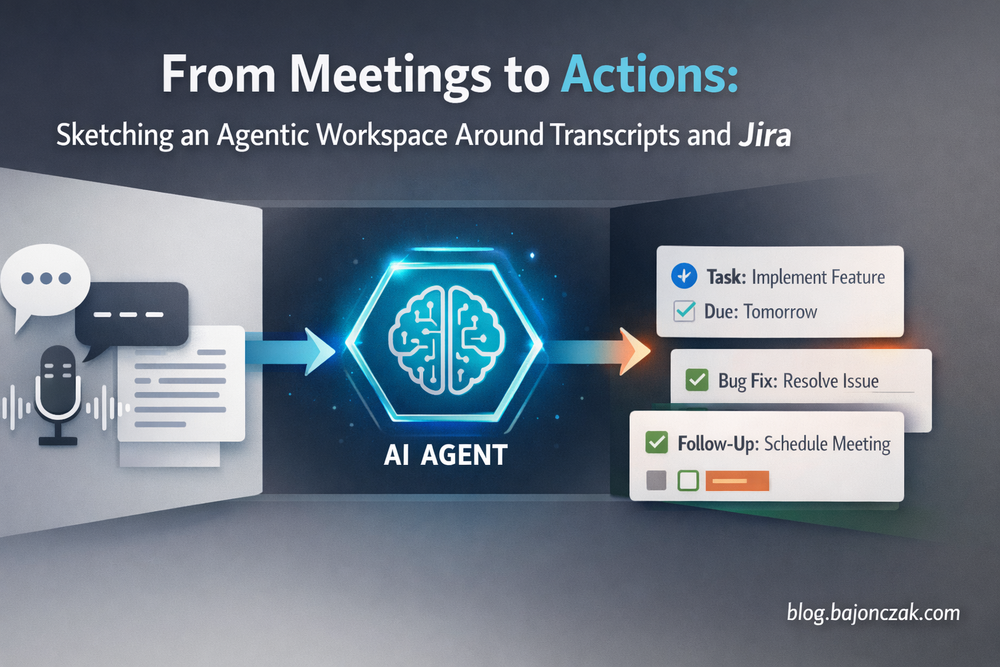
- a project meeting is recorded and transcribed,
- an AI agent analyses the transcript,
- creates Jira tickets and follow-ups,
- tracks decisions, and
- can trigger actions later based on what was agreed.
This is not a full product spec. It’s my way of thinking through how such a system could look if we built it on top of the tools many of us already use today.
What I mean by “agentic workspace”
The phrase sounds bigger than it should. For me, an agentic workspace is simply this:
A working environment where AI agents are first-class citizens alongside humans, with their own capabilities, memory and responsibilities.
Not just a chatbot in the corner of your screen. Not just a “copilot” that suggests text. Instead, an agent that:
- has clearly defined tools (APIs, integrations),
- can keep context over longer periods of time,
- and doesn’t only react, but also becomes proactive when certain conditions are met.
Meetings are a great example, because today they are often a black hole for information: we talk, we decide, we forget.
The meeting problem I actually want to solve
I don’t want pretty transcripts. I want fewer dropped balls.
In a typical project meeting today, this is what happens:
- we discuss problems, ideas and options,
- someone (maybe) takes rough notes,
- someone is supposed to create Jira tickets,
- someone is supposed to “bring this topic up again next week”.
One week later:
- nobody remembers exactly what was agreed,
- tickets are missing or too vague,
- and decisions exist only as “didn’t we say we would…?”
These are exactly the places where an agent can help – not as a meeting replacement, but as:
- a silent listener,
- an analysis layer,
- and an integrator into Jira, Teams, email, etc.
A high-level architecture sketch
This is roughly how I imagine the setup:
- The meeting is recorded (e.g. in Teams or Zoom).
- Audio is transcribed (Azure Speech, Whisper, whatever you prefer).
- An agent receives the text and metadata (participants, project, date) as input.
- The agent has access to a few well-defined tools:
- Jira API (create issues, add comments),
- a project knowledge store (Confluence, SharePoint, or a vector index),
- notification channels (Teams, email),
- its own “Decisions & Actions” database.
- After the meeting, the agent analyses the transcript:
- What was discussed?
- Which tasks were assigned?
- Which decisions were made?
- Which questions remain open?
- Based on that, the agent creates:
- Jira issues with meaningful descriptions,
- a meeting summary,
- a list of decisions,
- a set of follow-ups with dates or triggers.
The point is: we don’t want someone to spend two hours doing “admin” after the meeting. We want that person to only review whether what the agent prepared is correct.
From transcript to Jira tickets: how an agent could work
The interesting part is the path from a raw transcript to concrete tickets.
A transcript snippet might look like this:
PM: We’ve had three incidents this month where the payment webhook timed out.
Dev: Right, we saw that. The retry logic is still the old version.
PM: Can we create a ticket to refactor that and add better logging?
Dev: Yes, assign it to me in the payments board. We should also add an alert in case the error rate spikes.
An agent receiving this transcript could “think” like this (simplified):
- Recognise that a task was defined (“create a ticket to refactor that and add better logging”).
- Recognise that this belongs to a specific area (“payments board”).
- Recognise that there is an additional request (“add an alert…”).
- Propose two tickets:
- Refactor payment webhook retry logic and improve logging.
- Add alerting for payment webhook error rate spikes.
- Use the Jira API to create draft issues for these.
- Attach them to the right project/board.
- Assign them to the mentioned person (“Dev”).
- Attach the relevant transcript snippet as context.
In code, this might roughly look like (pseudo TypeScript):
type MeetingAction = {
  type: 'ticket' | 'decision' | 'question';
  summary: string;
  details: string;
  assignee?: string;
  projectKey?: string;
};

async function processMeetingTranscript(transcript: string) {
  // 1) Ask the agent/LLM to extract structured actions
  const actions: MeetingAction[] = await agent.extractActions(transcript);

  for (const action of actions) {
    if (action.type === 'ticket') {
      await createJiraIssue({
        projectKey: action.projectKey ?? 'PAYMENTS',
        summary: action.summary,
        description: action.details + '\n\nSource: meeting transcript snippet',
        assignee: action.assignee
      });
    }

    if (action.type === 'decision') {
      await storeDecisionInDb(action.summary, action.details);
    }
  }
}
The “agentic” part lives inside agent.extractActions(): that’s where you use a model (ideally one that knows your project context) to turn free-form language into structured objects.
Jira remains Jira. You’re not building a new ticketing system. You’re building a layer that connects meetings with Jira.
Tracking decisions separately from tickets
Tickets are important, but for me, a second piece is just as interesting: decisions.
A lot of later discussions revolve around what we “thought we had decided”:
- “Didn’t we agree not to ship feature X before Q4?”
- “Who actually gave the go for that new API structure?”
In an agentic workspace, I’d treat decisions as their own data type, for example:
- Decision: “We will deprecate endpoint /v1/orders by end of Q3.”
- Context: project, participants, date, meeting link.
- Related: Jira tickets, PRs, docs.
The agent can extract these decisions from the transcript and store them in a dedicated table:
type Decision = {
  id: string;
  summary: string;
  details: string;
  decidedAt: string;
  participants: string[];
  meetingUrl?: string;
};

async function storeDecisionInDb(summary: string, details: string) {
  const decision: Decision = {
    id: crypto.randomUUID(),
    summary,
    details,
    decidedAt: new Date().toISOString(),
    participants: [], // from meeting metadata
    meetingUrl: '' // link to recording
  };

  await db.insert('decisions', decision);
}
Later, the same or a different agent can use this decision database to:
- push decisions into Confluence/SharePoint pages,
- remind people of previous agreements during new discussions (“we already decided this on 12 Feb…”),
- or generate reports (“what were the major decisions last quarter?”).
Follow-ups and reminders: where agents become really useful
The last building block is follow-ups. This is the part humans love to postpone – and then forget.
An agent can apply relatively simple rules like:
- “If a follow-up time is mentioned in the meeting (‘next week’, ‘in two days’), create a reminder.”
- “If a ticket created from a meeting is still in ‘To Do’ after X days, remind the participants.”
Technically, this looks like a normal reminder system:
type FollowUp = {
  id: string;
  dueAt: string;
  description: string;
  relatedTicketId?: string;
  channel: 'teams' | 'email';
  recipients: string[];
};

async function scheduleFollowUp(followUp: FollowUp) {
  await db.insert('followups', followUp);
}

async function runFollowUpCron() {
  const now = new Date().toISOString();
  const due = await db.query('followups').where('dueAt <= ?', now);

  for (const f of due) {
    await notify(f);
    await db.delete('followups', f.id);
  }
}
The difference compared to a classic reminder system is that:
- the follow-ups don’t have to be entered manually,
- the agent extracts them from the meeting language (“let’s revisit this in two weeks”),
- and the agent has enough context to send meaningful messages.
That could look like this:
“Two weeks ago you decided to refactor the payment webhook retry logic. The ticket is still in ‘To Do’. Do you want to: (1) bump the priority, (2) change the due date, (3) update the decision log?”
What I would and wouldn’t trust an agent with
As nice as all this sounds, I still wouldn’t blindly hand everything to an agent, even in an agentic workspace.
Things I would trust an agent with:
- Structuring transcripts into topics, actions and decisions.
- Creating draft tickets that a human quickly reviews.
- Documenting decisions and follow-ups.
- Sending reminders.
Things I’d be careful with:
- Creating and assigning tickets in critical projects without review.
- Formulating binding promises (“we will deliver X by Y”) without human confirmation.
- Making security- or compliance-relevant decisions.
The balance for me is clear: the agent should remove repetitive, boring work and make sure less falls between the cracks – but responsibility and final decisions stay with the team.
Conclusion: an agentic workspace starts with habits, not tools
For me, the step towards an agentic workspace is not to introduce a big new platform immediately.
It starts with:
- identifying workflows where a lot of context gets lost (meetings are an obvious candidate),
- defining agents that can help there in a meaningful way (transcripts, tickets, decisions, follow-ups),
- and wiring them into existing systems (Jira, M365, SAP, whatever you use) in a clear and limited way.
The meeting example here is just a starting point. The same pattern applies to other areas:
- code reviews (an agent observes recurring themes and suggests improvements),
- infrastructure changes (an agent links changes to incidents and runbooks),
- customer communication (an agent summarises support tickets and feedback per customer).
The core stays the same: agents shouldn’t just react when we talk to them – they should actively help us work. And meetings, where we currently say too much and record too little, are a good place to start.