Orchestrating SAP and Entra ID with MCP: A Practical Sync & Insights Agent
In many enterprises, SAP (especially SuccessFactors) is still the source of truth for people and org data, while Entra ID (formerly Azure AD) is the front door for apps and services.
Bridging both worlds is usually done with brittle custom scripts, point-to-point sync jobs, or black-box connectors that are hard to debug.
In this post I will show how to use the Model Context Protocol (MCP) as a thin orchestration layer between SAP and Entra ID:
- to compare what exists in both systems,
- to generate a delta report,
- and to provide safe hooks for remediation (tickets, follow-ups) – without giving an agent god-mode access.
I will keep it concrete and code-backed, not just architecture diagrams.
1. What we want to achieve
The goal is a small MCP server that exposes tools like:
sap_list_users– fetch users from SAP/SuccessFactorsentra_list_users– fetch users from Entra IDreport_mismatches– compute and return deltas:- users in SAP but not in Entra
- users in Entra but not in SAP
- users with mismatched attributes (e.g. department, manager)
An LLM/agent (Copilot or any MCP-aware client) can then ask:
“Check if there are mismatches between SAP and Entra ID for the Engineering department and give me a summary plus CSV.”
The agent does the orchestration, but all hard security and connectivity lives in your backend, not in the model.
2. High-level architecture
At a high level, the setup looks like this:
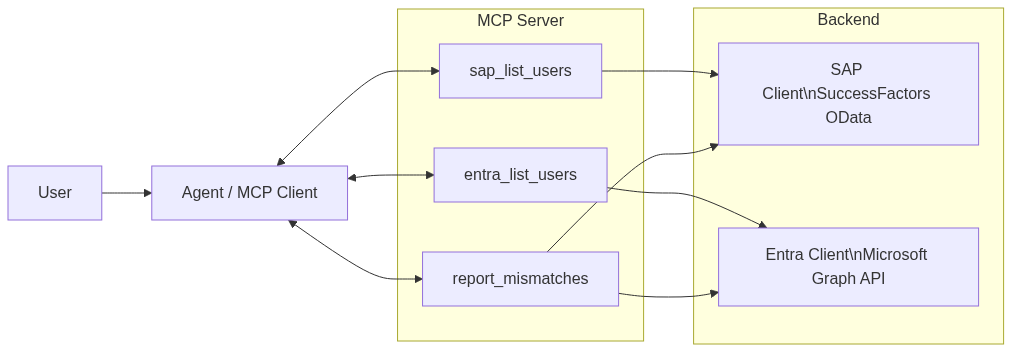
The MCP server exposes tools, tools delegate to typed backend clients for SAP and Entra. The agent only sees high-level operations; it never touches raw credentials.
3. Project setup
We will build a minimal Node.js / TypeScript project:
mkdir mcp-sap-entra-agent
cd mcp-sap-entra-agent
npm init -y
npm install typescript ts-node @types/node axios
npm install @modelcontextprotocol/sdk
npx tsc --init
Folder structure:
mcp-sap-entra-agent/
  src/
    config.ts
    sapClient.ts
    entraClient.ts
    mismatches.ts
    mcpServer.ts
  .env
  package.json
  tsconfig.json
Environment (.env, never commit this):
SAP_BASE_URL="https://api.successfactors.eu/odata/v2"
SAP_USERNAME="..."
SAP_PASSWORD="..."  # or OAuth token

ENTRA_TENANT_ID="..."
ENTRA_CLIENT_ID="..."
ENTRA_CLIENT_SECRET="..."
4. Configuration helper
// src/config.ts
import 'dotenv/config';

export const SAP_BASE_URL = process.env.SAP_BASE_URL!;
export const SAP_USERNAME = process.env.SAP_USERNAME!;
export const SAP_PASSWORD = process.env.SAP_PASSWORD!;

export const ENTRA_TENANT_ID = process.env.ENTRA_TENANT_ID!;
export const ENTRA_CLIENT_ID = process.env.ENTRA_CLIENT_ID!;
export const ENTRA_CLIENT_SECRET = process.env.ENTRA_CLIENT_SECRET!;

if (!SAP_BASE_URL || !SAP_USERNAME || !SAP_PASSWORD) {
  console.warn('[WARN] SAP config incomplete – SAP tools will not work until configured.');
}

if (!ENTRA_TENANT_ID || !ENTRA_CLIENT_ID || !ENTRA_CLIENT_SECRET) {
  console.warn('[WARN] Entra config incomplete – Entra tools will not work until configured.');
}
5. SAP client (SuccessFactors via OData)
// src/sapClient.ts
import axios from 'axios';
import { SAP_BASE_URL, SAP_USERNAME, SAP_PASSWORD } from './config';

export type SapUser = {
  userId: string;
  email: string | null;
  firstName: string | null;
  lastName: string | null;
  department: string | null;
};

export async function listSapUsers(limit = 500): Promise<SapUser[]> {
  if (!SAP_BASE_URL) {
    throw new Error('SAP_BASE_URL not configured');
  }

  const url = `${SAP_BASE_URL}/User?$format=json&$top=${limit}&$select=userId,email,firstName,lastName,department`;

  const resp = await axios.get(url, {
    auth: {
      username: SAP_USERNAME,
      password: SAP_PASSWORD,
    },
  });

  const results = resp.data?.d?.results ?? [];
  return results.map((r: any) => ({
    userId: r.userId,
    email: r.email || null,
    firstName: r.firstName || null,
    lastName: r.lastName || null,
    department: r.department || null,
  }));
}
6. Entra ID client (Microsoft Graph)
// src/entraClient.ts
import axios from 'axios';
import {
  ENTRA_TENANT_ID,
  ENTRA_CLIENT_ID,
  ENTRA_CLIENT_SECRET,
} from './config';

export type EntraUser = {
  id: string;
  userPrincipalName: string;
  mail: string | null;
  displayName: string | null;
  department: string | null;
};

async function getAccessToken(): Promise<string> {
  const url = `https://login.microsoftonline.com/${ENTRA_TENANT_ID}/oauth2/v2.0/token`;
  const params = new URLSearchParams();
  params.append('client_id', ENTRA_CLIENT_ID);
  params.append('client_secret', ENTRA_CLIENT_SECRET);
  params.append('scope', 'https://graph.microsoft.com/.default');
  params.append('grant_type', 'client_credentials');

  const resp = await axios.post(url, params);
  return resp.data.access_token as string;
}

export async function listEntraUsers(limit = 500): Promise<EntraUser[]> {
  const token = await getAccessToken();
  const url = `https://graph.microsoft.com/v1.0/users?$top=${limit}&$select=id,userPrincipalName,mail,displayName,department`;

  const resp = await axios.get(url, {
    headers: { Authorization: `Bearer ${token}` },
  });

  const value = resp.data?.value ?? [];
  return value.map((u: any) => ({
    id: u.id,
    userPrincipalName: u.userPrincipalName,
    mail: u.mail || null,
    displayName: u.displayName || null,
    department: u.department || null,
  }));
}
7. Computing mismatches
// src/mismatches.ts
import { SapUser } from './sapClient';
import { EntraUser } from './entraClient';

export type SyncMismatch = {
  type: 'MissingInEntra' | 'MissingInSap' | 'AttributeMismatch';
  sapUser?: SapUser;
  entraUser?: EntraUser;
  details?: string;
};

function normalizeEmail(email: string | null): string | null {
  if (!email) return null;
  return email.trim().toLowerCase();
}

export function computeMismatches(
  sapUsers: SapUser[],
  entraUsers: EntraUser[],
): SyncMismatch[] {
  const mismatches: SyncMismatch[] = [];

  const entraByEmail = new Map<string, EntraUser>();
  const entraByUpn = new Map<string, EntraUser>();

  for (const e of entraUsers) {
    const emailNorm = normalizeEmail(e.mail);
    if (emailNorm) {
      entraByEmail.set(emailNorm, e);
    }
    entraByUpn.set(e.userPrincipalName.toLowerCase(), e);
  }

  // 1) SAP -> Entra
  for (const s of sapUsers) {
    const emailNorm = normalizeEmail(s.email);
    let match: EntraUser | undefined;

    if (emailNorm) {
      match = entraByEmail.get(emailNorm);
    }
    if (!match && s.userId) {
      match = entraByUpn.get(s.userId.toLowerCase());
    }

    if (!match) {
      mismatches.push({
        type: 'MissingInEntra',
        sapUser: s,
        details: `No Entra user matching SAP userId=${s.userId}, email=${s.email}`,
      });
      continue;
    }

    // compare attributes
    const sapDept = (s.department || '').trim();
    const entraDept = (match.department || '').trim();

    if (sapDept && entraDept && sapDept !== entraDept) {
      mismatches.push({
        type: 'AttributeMismatch',
        sapUser: s,
        entraUser: match,
        details: `Department mismatch: SAP="${sapDept}" vs ENTRA="${entraDept}"`,
      });
    }
  }

  // 2) Entra -> SAP
  const sapEmails = new Set(
    sapUsers.map(s => normalizeEmail(s.email)).filter((e): e is string => !!e),
  );

  const sapUserIds = new Set(
    sapUsers.map(s => s.userId.toLowerCase()),
  );

  for (const e of entraUsers) {
    const emailNorm = normalizeEmail(e.mail);
    const upn = e.userPrincipalName.toLowerCase();

    const emailInSap = emailNorm && sapEmails.has(emailNorm);
    const idInSap = sapUserIds.has(upn);

    if (!emailInSap && !idInSap) {
      mismatches.push({
        type: 'MissingInSap',
        entraUser: e,
        details: `No SAP user for Entra UPN=${e.userPrincipalName}, mail=${e.mail}`,
      });
    }
  }

  return mismatches;
}
8. Wiring it into an MCP server
// src/mcpServer.ts
import { createMcpServer, ToolDefinition } from '@modelcontextprotocol/sdk';
import { listSapUsers } from './sapClient';
import { listEntraUsers } from './entraClient';
import { computeMismatches } from './mismatches';

const tools: ToolDefinition[] = [
  {
    name: 'sap_list_users',
    description: 'List users from SAP / SuccessFactors. Optional: limit.',
    inputSchema: {
      type: 'object',
      properties: {
        limit: { type: 'number', minimum: 1, maximum: 2000 },
      },
      required: [],
    },
    handler: async (input) => {
      const limit = input.limit ?? 500;
      const sapUsers = await listSapUsers(limit);
      return { users: sapUsers };
    },
  },
  {
    name: 'entra_list_users',
    description: 'List users from Entra ID (Azure AD). Optional: limit.',
    inputSchema: {
      type: 'object',
      properties: {
        limit: { type: 'number', minimum: 1, maximum: 5000 },
      },
      required: [],
    },
    handler: async (input) => {
      const limit = input.limit ?? 500;
      const entraUsers = await listEntraUsers(limit);
      return { users: entraUsers };
    },
  },
  {
    name: 'report_mismatches',
    description:
      'Compare SAP and Entra ID users and return mismatches (missing users, attribute mismatches).',
    inputSchema: {
      type: 'object',
      properties: {
        limitSap: { type: 'number', minimum: 1, maximum: 2000 },
        limitEntra: { type: 'number', minimum: 1, maximum: 5000 },
      },
      required: [],
    },
    handler: async (input) => {
      const sapUsers = await listSapUsers(input.limitSap ?? 1000);
      const entraUsers = await listEntraUsers(input.limitEntra ?? 2000);
      const mismatches = computeMismatches(sapUsers, entraUsers);

      return {
        totalSap: sapUsers.length,
        totalEntra: entraUsers.length,
        mismatchCount: mismatches.length,
        mismatches,
      };
    },
  },
];

async function startServer() {
  const server = createMcpServer({
    tools,
  });

  await server.listen(3000);
  console.log('[MCP] SAP/Entra agent listening on :3000');
}

startServer().catch((err) => {
  console.error('[MCP] Failed to start server', err);
  process.exit(1);
});
9. Hardening and next steps
- Scope your Graph permissions carefully (no unnecessary Directory.Read.All in production).
- Add logging & auditing around which user triggered which comparison.
- Keep remediation (creating/updating users) as a separate, well-controlled flow.
- Consider adding department filters or project keys to narrow down the comparison.
In a follow-up, you could plug this MCP server into an agent that not only generates the delta report, but also opens Jira tickets or compiles a weekly summary for your identity team.