SAP vs. Entra ID: Why Your User Sync Should Be a Product, Not a Script
In a lot of organisations I talk to, the story sounds like this:
- SAP (or SuccessFactors) is the source of truth for people and org structure.
- Entra ID (formerly Azure AD) is the front door for apps and services.
- Somewhere between them lives a “sync”.
When you ask what that sync is, you usually get one of these answers:
- “We have a script for that.”
- “That’s handled by a black-box connector, don’t touch it.”
- “IT and HR sort it out manually when things break.”
That might have been acceptable in 2012. In 2026, with hundreds of SaaS apps behind Entra, compliance requirements and AI agents that can act on top of your identity graph, I think that mindset is dangerous.
My argument in this post is simple:
Your SAP ↔ Entra ID user sync is not a script. It’s a product.
And you should treat it like one.
1. What goes wrong when sync is “just a script”
When user sync is an invisible background job, a couple of things tend to happen:
- Responsibilities are fuzzy (“Is this HR’s fault or IT’s fault?”).
- There is no clear SLO (“How long until changes in SAP show up in Entra?”).
- Drift accumulates silently:
- departments don’t match,
- people who left still have accounts,
- service accounts live forever,
- shadow roles are assigned and never cleaned up.
- Nobody has a simple answer to “How many users are in SAP but not in Entra (and vice versa)?”.
When you then start layering things like Conditional Access, Just-in-Time access or Copilot on top of Entra, this drift turns from nuisance into real risk.
2. Thinking of sync as a product
If you treat the SAP ↔ Entra sync as a product, the conversation changes.
A product has:
- a clear scope and responsible owner,
- defined inputs and outputs,
- health metrics and SLOs,
- and a roadmap for improvement.
In this framing, the sync product might be responsible for:
- keeping core identity attributes aligned (name, department, manager, employment status),
- ensuring there are no “orphaned” accounts (SAP-only or Entra-only, within agreed rules),
- providing reliable data for downstream systems (RBAC, licences, security policies),
- and giving HR / IT insights about drift, not just blind automation.
This is where I like the idea of an AI-assisted Sync Insights agent on top of the raw mechanics.
3. A Sync Insights agent as a first-class tool
In a previous post, I sketched an MCP-based agent that:
- talks to SAP/SuccessFactors via API,
- talks to Entra ID via Microsoft Graph,
- compares both sides,
- and returns a structured report of mismatches.
The key twist is: it doesn’t auto-fix anything. It gives you visibility.
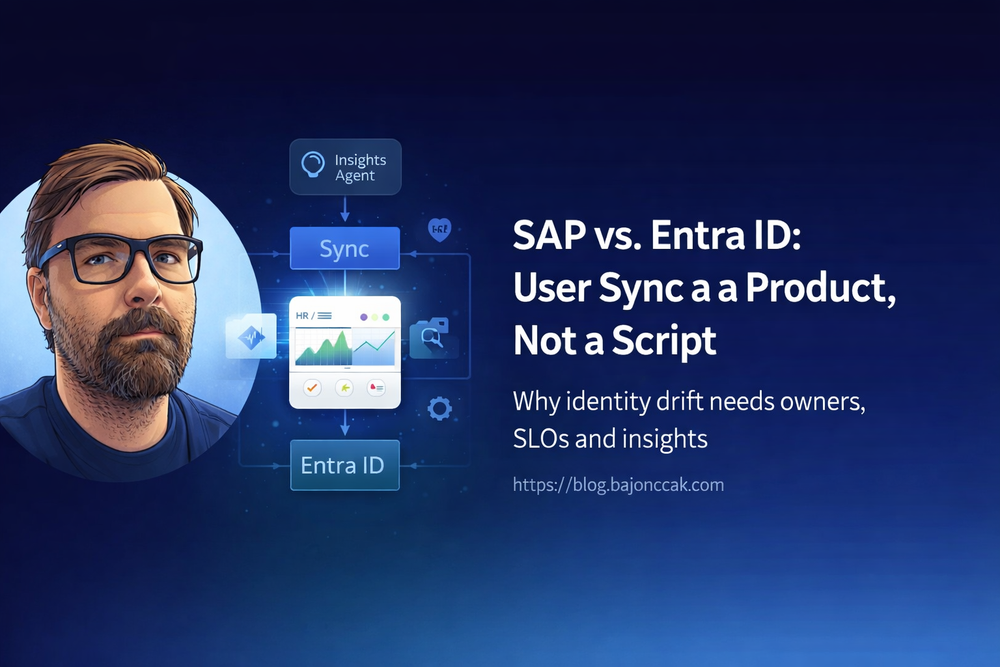
Conceptually the flow looks like this:
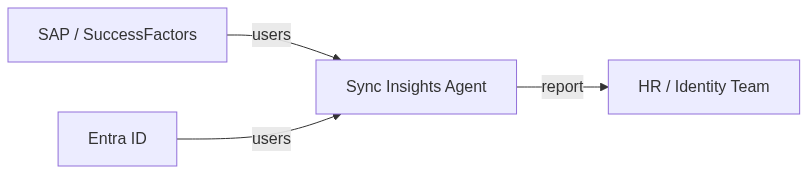
The agent can answer questions like:
- “Show me all active employees in SAP who have no Entra account.”
- “List Entra accounts not present in SAP (excluding technical accounts).”
- “Where do department attributes differ between SAP and Entra?”
Under the hood, you can structure it as a small Node/TypeScript service (or a Foundry agent) with tools like:
sap_list_users(limit)entra_list_users(limit)report_mismatches(filters)
From a Foundry/MCP perspective, the implementation details are less important than the principle: you expose high-level capabilities, not raw SQL or shell.
3.1. Example: computing mismatches
This is roughly what the core comparison might look like (simplified):
type SapUser = {
  userId: string;
  email: string | null;
  department: string | null;
};

type EntraUser = {
  userPrincipalName: string;
  mail: string | null;
  department: string | null;
};

type SyncMismatch = {
  type: 'MissingInEntra' | 'MissingInSap' | 'AttributeMismatch';
  sapUser?: SapUser;
  entraUser?: EntraUser;
  details: string;
};

function normalizeEmail(email: string | null): string | null {
  return email ? email.trim().toLowerCase() : null;
}

export function computeMismatches(
  sapUsers: SapUser[],
  entraUsers: EntraUser[]
): SyncMismatch[] {
  const mismatches: SyncMismatch[] = [];

  const entraByEmail = new Map();
  const entraByUpn = new Map();

  for (const e of entraUsers) {
    const emailNorm = normalizeEmail(e.mail);
    if (emailNorm) entraByEmail.set(emailNorm, e);
    entraByUpn.set(e.userPrincipalName.toLowerCase(), e);
  }

  // SAP -> Entra
  for (const s of sapUsers) {
    const emailNorm = normalizeEmail(s.email);
    let match: EntraUser | undefined;

    if (emailNorm) match = entraByEmail.get(emailNorm);
    if (!match) match = entraByUpn.get(s.userId.toLowerCase());

    if (!match) {
      mismatches.push({
        type: 'MissingInEntra',
        sapUser: s,
        details: `No Entra user for SAP userId=${s.userId}, email=${s.email}`,
      });
      continue;
    }

    const sapDept = (s.department || '').trim();
    const entraDept = (match.department || '').trim();

    if (sapDept && entraDept && sapDept !== entraDept) {
      mismatches.push({
        type: 'AttributeMismatch',
        sapUser: s,
        entraUser: match,
        details: `Department mismatch: SAP="${sapDept}" vs ENTRA="${entraDept}"`,
      });
    }
  }

  // Entra -> SAP
  const sapEmails = new Set(
    sapUsers.map(s => normalizeEmail(s.email)).filter((e): e is string => !!e)
  );

  const sapUserIds = new Set(sapUsers.map(s => s.userId.toLowerCase()));

  for (const e of entraUsers) {
    const emailNorm = normalizeEmail(e.mail);
    const upn = e.userPrincipalName.toLowerCase();

    const emailInSap = emailNorm && sapEmails.has(emailNorm);
    const idInSap = sapUserIds.has(upn);

    if (!emailInSap && !idInSap) {
      mismatches.push({
        type: 'MissingInSap',
        entraUser: e,
        details: `No SAP user for Entra UPN=${e.userPrincipalName}, mail=${e.mail}`,
      });
    }
  }

  return mismatches;
}
You can then have the agent format this into a CSV, a table in Teams, or a ticket summary – whatever your identity team prefers.
4. Where Foundry fits into this picture
Foundry (and MCP in general) gives you a more structured way to expose these tools to agents:
- you describe tools like
sap_list_users,entra_list_users,report_mismatchesin a machine-readable schema, - you keep all credentials and real logic in your backend,
- the agent orchestrates calls and presents results, but doesn’t hold secrets.
In practice, I’d see a stack like:
- SAP API client + Entra Graph client (Node/TS, .NET, whatever you like),
- a thin Foundry/MCP server that exposes “Sync Insights” tools,
- a Foundry agent (or Copilot Studio scenario) that uses those tools to answer identity questions.
The key point is: Foundry is not the sync engine. It’s the orchestration/interaction layer on top of the engine.
5. Security trimming and guardrails
Identity data is sensitive. A Sync Insights agent should be held to the same standards as any identity admin tool.
A few guardrails I’d put in place:
- Run the backend under a dedicated identity with scoped permissions:
- for SAP: read-only on the relevant endpoints,
- for Entra: limited Graph permissions (no Directory.AccessAsUser.All in production).
- Record who asked which question and when, for auditing.
- Make clear that the agent does not auto-fix anything; it only reports.
- Expose “dangerous” actions (e.g. disable accounts, modify groups) via separate, more tightly controlled tools – or not at all.
The goal is to have an agent that helps you see problems early, not an unsupervised system that changes identities on the fly because a prompt asked nicely.
6. Treating sync as a product: what changes in practice?
If you accept the idea that SAP ↔ Entra sync is a product, a few concrete changes tend to follow:
- You assign an owner (or small team) responsible for identity integrity between the two systems.
- You define what “healthy” looks like (drift thresholds, sync latency, allowed exceptions).
- You invest in observability (reports, dashboards, agents) instead of just “it runs at 3am”.
- You give HR and IT a shared view of where reality and systems disagree.
Once you have that foundation, layering Foundry/MCP-style agents on top becomes a force multiplier instead of a risky experiment.
7. My take
In 2026, SAP and Entra are not going away. If anything, they’re getting tighter and more central as identity sources.
You can treat the sync between them as:
- “that one script we inherited from someone who left”,
- or as a small but critical product with proper attention.
If you pick the second option, things like Sync Insights agents, Foundry tools and AI-based reporting suddenly make a lot more sense – because sie sitzen auf einem Fundament, das jemand bewusst gebaut und verantwortet.
And that, in my view, is the only way to bring AI into identity management without waking up one day and realising nobody really knows who is supposed to have access to what.