SAP Tightens AI Data Access: A Clean Way to Connect SAP to Microsoft Fabric (On-Prem Gateway)
There’s a topic that keeps coming up in SAP + AI conversations right now: SAP tightening its API policy around third‑party generative AI and autonomous agents.
If you’re a customer, you can be annoyed (understandably). But you also have a practical problem to solve:
You still need SAP data in analytics and AI workflows – just without building on brittle, non‑published interfaces or violating terms.
This is where Microsoft Fabric becomes interesting, not as a “hack”, but as a clean way to build a governed data path from SAP into a platform you control.
In this post I want to answer two questions:
- Is it actually possible to connect SAP data to Fabric in an elegant way, even when direct third‑party AI data access becomes restricted?
- If yes: what does a sane, compliant architecture look like with Fabric + an on‑premises data gateway / connector?
Short answer: yes, it’s possible – as long as you design it like an enterprise data integration, not like “Copilot reads SAP” magic.
What SAP’s policy shift changes (and what it doesn’t)
The way I interpret the current situation is not “SAP blocks integration”. SAP has always had a strong line between:
- published, supported APIs and integration patterns, and
- undocumented/internal interfaces and mass extraction via side doors.
What’s new is the explicit attention on generative and autonomous AI scenarios – especially those that look like:
- large-scale extraction for third‑party model training,
- agents calling internal APIs in uncontrolled ways,
- or “shadow AI” data access paths that bypass SAP’s intended architectures.
For customers, the lesson is simple: if your AI strategy depends on undocumented SAP interfaces, it’s fragile. You want to sit on published APIs and official integration routes.
Why Fabric is a good place to land SAP data (in a governed way)
Microsoft Fabric is not “an AI tool”. It’s a data platform that gives you:
- pipelines (Data Factory experience),
- data flows / transformations,
- Lakehouse / Warehouse storage,
- Power BI,
- and governance controls around that (access, lineage, monitoring).
That matters because the best response to “SAP restricts third‑party AI data access” is usually not “find another backdoor”. It’s: build a clean, internal data product that you can then use for analytics and AI under your own governance.
The key enabler: getting from on-prem SAP to Fabric securely
If your SAP systems are on‑prem (or in a network segment that isn’t directly reachable from the internet), the practical question is: how do I connect Fabric to those sources?
In Fabric’s Data Factory experience, Microsoft supports connecting to on‑premises data sources via the on‑premises data gateway. This gateway runs inside your network and allows Fabric pipelines / data flows to reach internal systems without exposing them publicly.
In other words: the “connector” lives where your SAP is, not where the cloud is. That’s the elegant part.
What can you connect to?
From Microsoft’s own Fabric guidance, the on‑premises data gateway is the foundation for built‑in SAP connectors and also works with generic connectors like OData/ODBC/OLE DB/Oracle/etc. For SAP specifically, the options I see most often are:
- SAP OData (e.g. S/4HANA OData services, ECC OData services, SuccessFactors OData) using Fabric’s generic OData connector,
- SAP HANA using the appropriate driver via gateway,
- and in some cases specialized SAP connectors that rely on SAP-specific drivers installed alongside the gateway.
The exact best choice depends on your SAP landscape and what SAP exposes as published APIs in your context.
A reference architecture that stays on the safe side
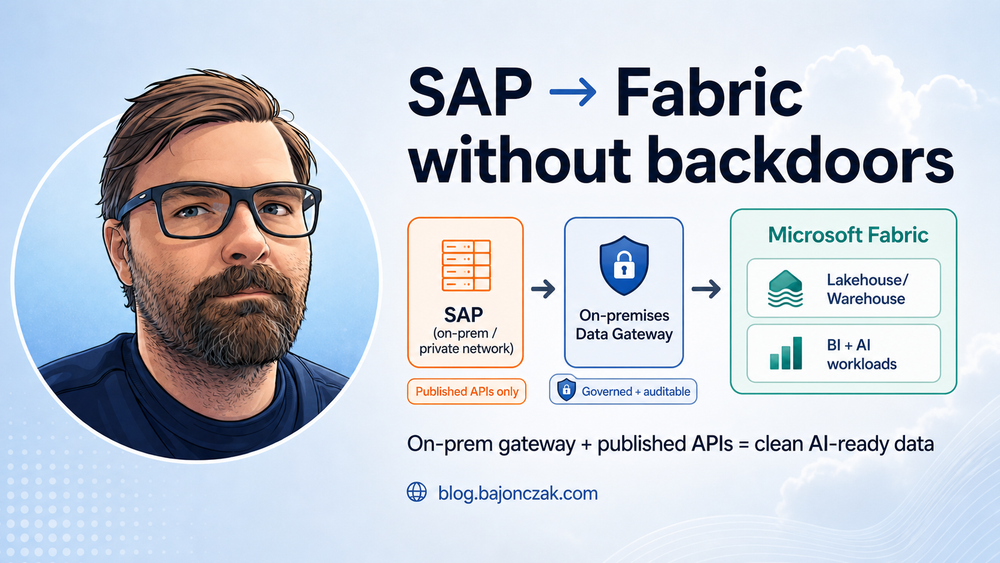
Here’s the architecture I’d recommend if the goal is: “Use SAP data for analytics and AI, but do it in a way that feels defensible to SAP, security, and auditors.”
flowchart LR
  SAP[SAP (on-prem / private network)] -->|Published APIs (OData/BAPI via supported connectors)| GW[On-premises Data Gateway]
  GW -->|Fabric Pipelines / Dataflows| LH[Fabric Lakehouse/Warehouse]
  LH --> BI[Power BI / Reports]
  LH --> AI[AI workloads (RAG, agents, notebooks)]
  AI -->|Outputs| M365[M365 / Teams / Copilot extensions]
The key ideas:
- Use published interfaces. No undocumented SAP tables scraped via ad‑hoc RFC calls “because it’s faster”.
- Land data in Fabric under governance. Access control, lineage, retention, and audit should exist at the data platform layer.
- AI consumes curated data products. Not raw SAP dumps, not uncontrolled “agent queries”, but a defined dataset with clear ownership.
How this helps with the “third-party AI” restriction
Even if SAP restricts “third‑party autonomous AI agents calling SAP APIs directly”, you still have multiple legitimate paths:
- You integrate SAP data into your data platform via supported interfaces.
- You apply your own governance (who sees what, what is exported, what is retained).
- You build AI workloads that operate on the curated Fabric data, not on uncontrolled SAP API access.
This doesn’t magically remove licensing or policy constraints. You still need to be compliant with SAP’s terms and your contract. But you’re no longer in the “shadow integration” territory where your entire AI plan depends on a technical loophole.
Practical considerations (what you need to clarify)
If you want to do this “for real”, there are a few questions you should clarify early:
- Which SAP APIs are officially published for your scenario? (S/4 vs ECC vs SuccessFactors can be very different.)
- Data minimisation: what is the smallest dataset that still creates value?
- Refresh patterns: do you need near-real-time, hourly, daily loads?
- Identity mapping: how do you map SAP identities/roles to who can see which data in Fabric?
- Security boundary: do you keep the gateway host locked down like a production integration server? (You should.)
- Downstream AI use: are you doing RAG over curated documents, analytics, or action-taking agents? Each needs different guardrails.
My take
When vendors tighten policies, the instinct is to look for technical workarounds. I think that’s the wrong move here.
If SAP is pushing customers away from uncontrolled third‑party AI data access, the best long‑term response is to build a proper, governed data path: published APIs, a controlled integration layer, and a curated dataset in a platform like Fabric.
Fabric + on‑premises data gateway is not a loophole. It’s a grown‑up architecture: the kind that lets you say “yes, we use SAP data for AI” and still sleep at night because you can explain, audit and control the flow.
If you want, I can follow up with a more concrete hands‑on version (step-by-step) once we pick one SAP source type (e.g. SuccessFactors OData, S/4 OData, or HANA) and a target pattern (Lakehouse vs Warehouse + Power BI + RAG).